IDP Is a Continuous Lifecycle, Not a One-Time Project
The biggest misconception about IDP is that it’s a “set and forget” solution.
In reality, IDP is a living system—continuously learning, improving, and adapting to business change.
Intelligent Document Processing (IDP) in MuleSoft is not a one-time configuration—it is a continuous lifecycle that blends design, development, integration, deployment, monitoring, and optimization.
The lifecycle depicted in the diagram represents how MuleSoft enables teams to build, reuse, govern, and continuously improve document automation assets.
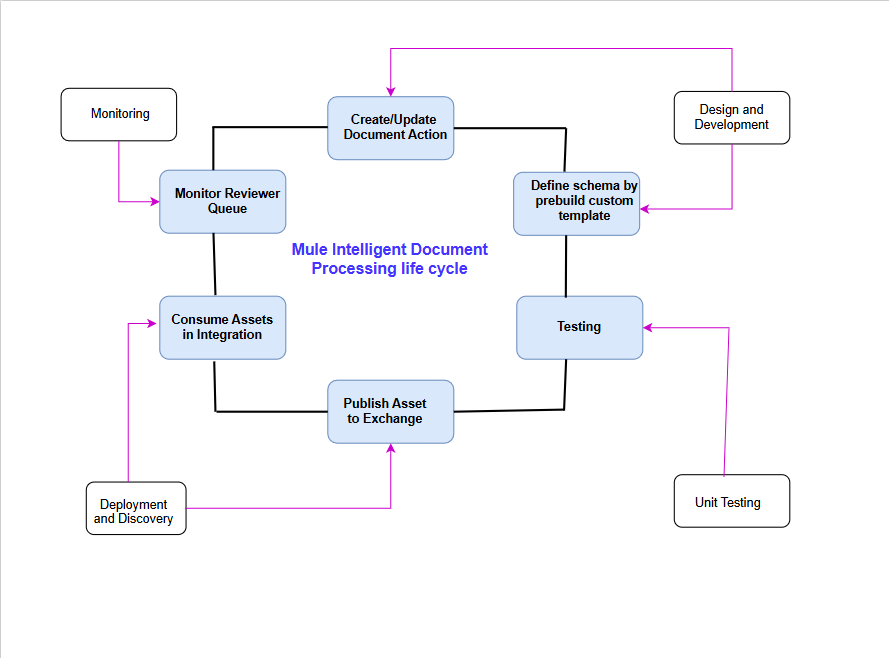
Let’s walk through each stage of the Mule Intelligent Document Processing lifecycle.
1. Design and Development
The lifecycle begins with Design and Development, where document automation requirements are translated into MuleSoft IDP capabilities.
At this stage, teams:
- Identify the document type (invoice, PO, claim, onboarding form, etc.)
- Define business objectives and success metrics
- Decide which document actions are required (extract, validate, approve, route)
- Design how IDP fits into existing API-led architecture
This phase ensures IDP is aligned with enterprise standards, downstream systems, and business processes from day one.
2. Define Schema Using Prebuilt or Custom Templates
Once the design is finalized, the next step is to define the document schema.
MuleSoft IDP allows teams to:
- Use prebuilt document templates for common use cases
- Create custom schemas for organization-specific documents
- Define required and optional fields
- Apply field-level rules, formats, and validations
Schemas serve as the contract between AI extraction and enterprise systems, ensuring that extracted data is structured, validated, and ready for integration.
3. Testing
After schemas and document actions are defined, testing ensures accuracy and reliability.
During this phase:
- Sample documents are processed
- Extraction accuracy is validated
- Confidence thresholds are evaluated
- Business rules are verified
Testing confirms that the IDP configuration behaves correctly across document variations before it is exposed to broader usage.
4. Unit Testing
Unit testing focuses on isolated validation of individual components.
This includes:
- Verifying schema field mappings
- Validating document actions
- Testing exception paths
- Ensuring confidence thresholds trigger correct outcomes
Unit testing reduces risk and ensures predictable behavior when the IDP asset is promoted to shared environments.
5. Publish Asset to Exchange
Once tested, the IDP configuration is published as a reusable asset to Anypoint Exchange.
Publishing to Exchange:
- Enables reuse across teams and projects
- Enforces governance and versioning
- Promotes consistency across environments
- Treats IDP configurations as first-class integration assets
This step is critical in making IDP a platform capability rather than a project-specific solution.
6. Deployment and Discovery
After publishing, the asset is deployed and made discoverable.
At this stage:
- IDP assets are deployed to runtime environments
- Integration teams discover and consume them
- Environment-specific configurations are applied
- Access and policies are enforced
Deployment and discovery ensure that document processing capabilities can be rapidly adopted without duplication.
7. Consume Assets in Integration
With the asset deployed, integration flows begin consuming the IDP capabilities.
MuleSoft integrations:
- Ingest documents via APIs, email, SFTP, or storage
- Invoke IDP for extraction and validation
- Route extracted data to ERP, CRM, finance, or analytics systems
- Orchestrate downstream business processes
This is where documents truly become actionable enterprise data through API-led connectivity.
8. Monitor Reviewer Queue
Not all documents can be processed with full automation.
Documents or fields with low confidence are routed to a Reviewer Queue.
Monitoring the reviewer queue allows teams to:
- Track exception volumes
- Identify problematic document layouts
- Detect schema gaps or rule failures
- Measure automation vs manual processing rates
Human review becomes an exception-based control mechanism, not a bottleneck.
9. Monitoring
Monitoring closes the loop in the lifecycle.
Using MuleSoft monitoring capabilities, teams track:
- Extraction accuracy trends
- Processing latency
- Manual review percentages
- SLA compliance
- Business KPIs such as cost savings and cycle time reduction
Insights from monitoring feed directly back into schema updates, document actions, and model improvements, restarting the lifecycle.
10. Create or Update Document Actions (Continuous Improvement)
Based on monitoring insights, teams continuously:
- Refine document actions
- Update schemas
- Adjust confidence thresholds
- Enhance validation rules
This step connects monitoring back to design and development, making the lifecycle iterative and self-improving.
Key Takeaway: IDP as a Continuous Lifecycle
The MuleSoft Intelligent Document Processing lifecycle is intentionally circular.
Each stage feeds the next, ensuring that document automation:
- Evolves with business needs
- Improves accuracy over time
- Remains governed and reusable
- Scales across the enterprise