Hands On Using DataWeave in Salesforce Apex
Why DataWeave in Apex Matters
For years, Salesforce developers have relied heavily on Apex code, wrapper classes, manual JSON parsing, and custom utility methods to transform data between systems. While this approach works, it often becomes difficult to maintain as integrations grow in complexity.
Modern enterprise integrations no longer deal with simple payloads alone. Today’s Salesforce ecosystems interact with ERPs, CRMs, payment systems, healthcare platforms, document processing engines, and AI-driven applications, all of which exchange data in multiple formats such as JSON, XML, CSV, and flat files.
This is where DataWeave in Apex becomes a game changer.
Originally known as the powerful transformation engine behind MuleSoft, DataWeave is now available directly inside Salesforce Apex, enabling developers to perform complex transformations using a declarative and reusable approach instead of writing large amounts of procedural parsing logic.
Rather than spending hours writing nested loops, wrapper classes, and conditional mappings, developers can now define transformations in a concise and readable DataWeave script.
The Traditional Apex Challenge
Salesforce developers commonly face challenges such as:
- Parsing deeply nested JSON responses
- Handling XML transformations
- Converting CSV files into Salesforce records
- Mapping payloads between multiple systems
- Managing bulky wrapper classes
- Maintaining transformation logic scattered across Apex classes
- Rewriting similar mapping logic across projects
As integrations scale, these approaches often lead to:
- Increased technical debt
- Reduced readability
- Higher maintenance effort
- Difficult debugging
- Slower onboarding for new developers
A seemingly simple transformation can quickly turn into hundreds of lines of Apex code.
What Changes with DataWeave?
DataWeave introduces a transformation-first mindset into Salesforce development.
Instead of manually traversing payloads field by field, developers define what the output should look like, while DataWeave handles the transformation internally.
This significantly simplifies:
- JSON to Salesforce object mappings
- XML processing
- CSV generation and parsing
- Canonical data transformations
- API payload normalization
- Multi-format data conversions
The result is cleaner, reusable, and far more maintainable integration logic.
Traditional Apex vs DataWeave
| Traditional Apex Approach | DataWeave Approach |
|---|---|
| Manual JSON parsing | Declarative transformations |
| Large wrapper classes | Lightweight scripts |
| Procedural mapping logic | Readable transformation definitions |
| Hard to maintain | Easier to modify and reuse |
| Format-specific handling | Multi-format support |
| Repeated utility methods | Centralized transformation layer |
| Complex nested loops | Simplified mapping expressions |
Why This Matters for Enterprise Architecture
The introduction of DataWeave into Apex is more than just a new developer feature — it represents the convergence of Salesforce and integration engineering practices.
Organizations already using Salesforce and MuleSoft can now align transformation standards across platforms using a common language and approach.
This creates several strategic advantages:
- Reuse transformation expertise across teams
- Standardize integration patterns
- Reduce duplicate transformation logic
- Improve maintainability across ecosystems
- Accelerate onboarding for integration developers
- Create cleaner separation between business logic and transformation logic
For enterprise architects, this opens the door to building more consistent and scalable integration solutions across the Salesforce and MuleSoft landscape.
A Paradigm Shift for Salesforce Developers
DataWeave in Apex is not simply about writing shorter code.
It changes how developers think about integrations.
Instead of treating transformation as scattered utility logic hidden inside Apex classes, transformation becomes a dedicated and reusable layer within the architecture.
As Salesforce ecosystems continue evolving toward API-first, AI-driven, and event-driven architectures, capabilities like DataWeave will play a critical role in building scalable, future-ready enterprise applications.
In the previous blog step by step guide to setup dataweave in VSCode , the local development environment for DataWeave was established -with VS Code configured, the Anypoint Code Builder, DataWeave Extension installed, the Salesforce Extension Pack connected, and the .dwl script files created and ready for transformation logic. With the development environment fully in place, the next step is putting it to work. DataWeave in Apex is a powerful, declarative transformation engine that enables developers to handle complex data formats such as XML, JSON, and CSV with minimal code and maximum efficiency.
Two Proof of Concepts (POCs) are demonstrated here, together showcasing a complete bi–directional integration pattern built on the foundation established:
- POC 1 – Consuming an external XML API and creating Salesforce records from the response.
- POC 2 – Retrieving Salesforce records, transforming them into JSON, and pushing the data to an external REST API via HTTP POST.
POC 1: Consuming an XML API and Creating Salesforce Records
Solution Overview
The inbound integration follows a structured, step-by-step approach:
- API Callout : Salesforce initiates an HTTP GET callout to an external system to retrieve data.
- XML Response Handling : The external API returns data in XML format, which is not natively consumable by Apex without transformation.
- Data Transformation with DataWeave : A DataWeave script (.dwl) converts the raw XML response into Apex-compatible objects using a declarative, schema-aware approach.
- Data Mapping :The transformed data is mapped to standard or custom Salesforce objects such as Account or Contact.
- Record Creation via DML : Salesforce performs insert or upsert DML operations to persist the transformed data as Salesforce records.
Why DataWeave for XML Parsing?
In Apex, working with XML requires writing a lot of step-by-step code to go through the data, which makes it complex and hard to understand. DataWeave makes this easier by allowing you to write short and clear code where you directly define what output you want. This reduces the amount of code and helps avoid errors in real projects.
DataWeave Script : Transforming XML to Apex Objects
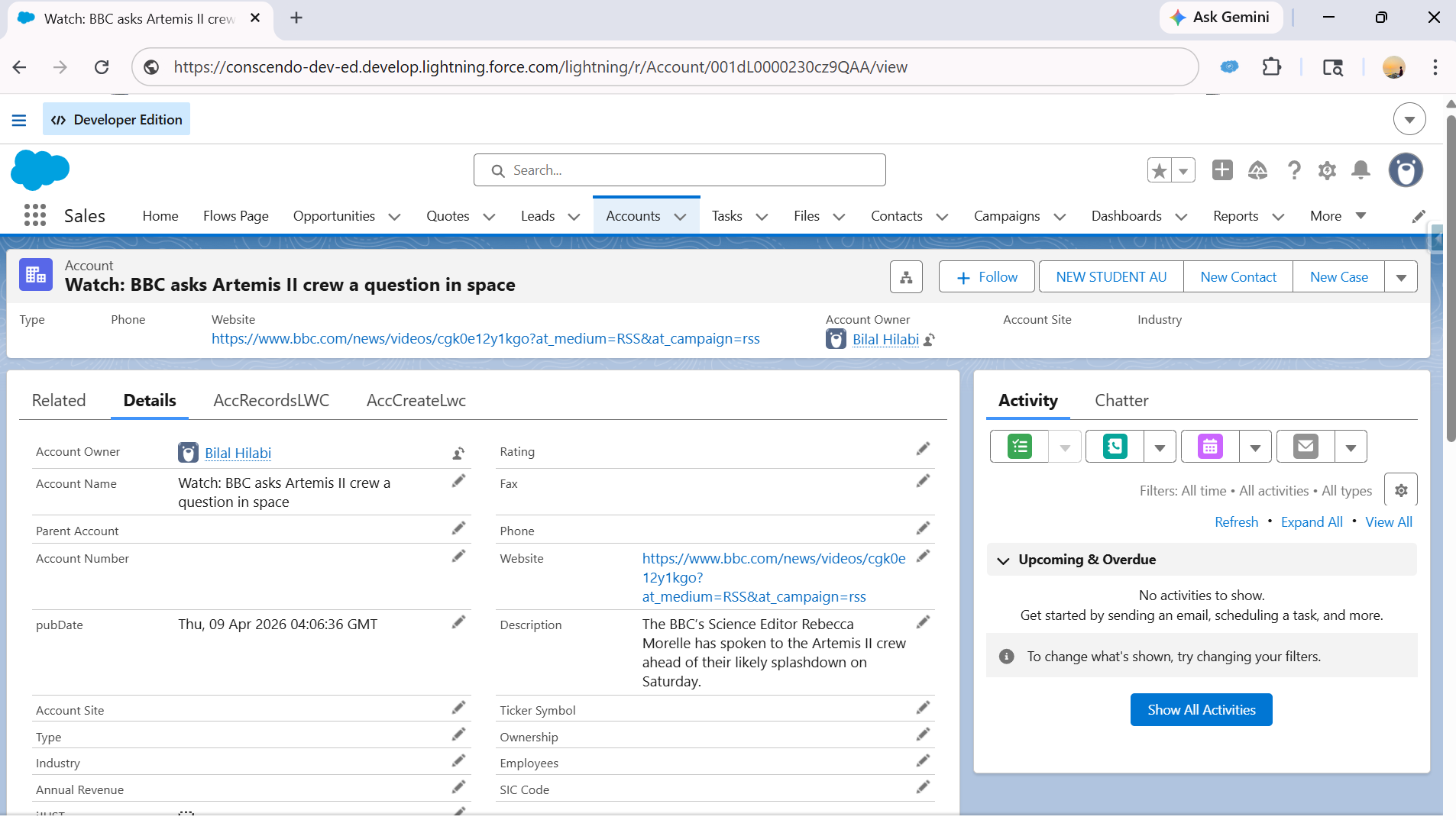
The following DataWeave script (xmlToJsonPart2.dwl) accepts the raw XML response from the external API, traverses the RSS feed structure, and maps each item to a Salesforce Account object.
Input XML:
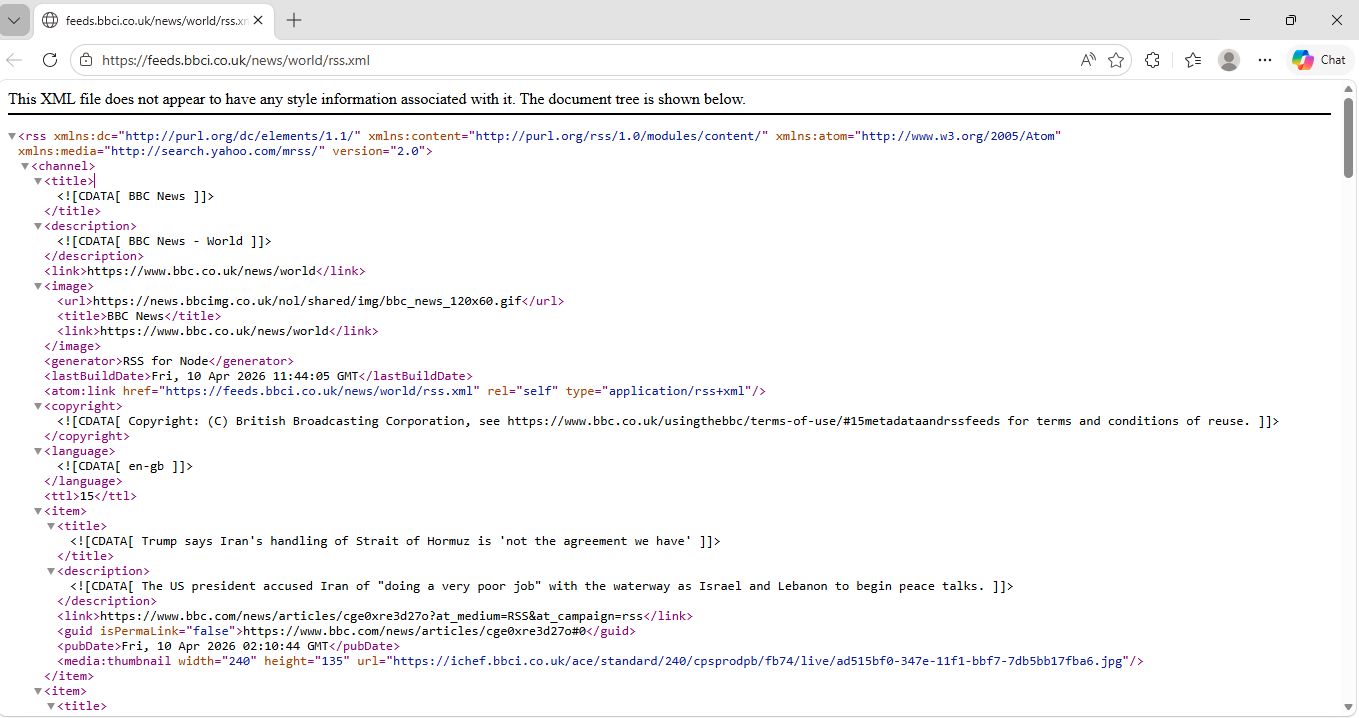
<?xml version='1.0' encoding='UTF-8'?>
<rss version="2.0">
  <channel>
    <title><![CDATA[ BBC News ]]></title>
    <description><![CDATA[ BBC News - World ]]></description>
    <link>https://www.bbc.co.uk/news/world</link>
    <image>
      <url>https://news.bbcimg.co.uk/nol/shared/img/bbc_news_120x60.gif</url>
      <title>BBC News</title>
      <link>https://www.bbc.co.uk/news/world</link>
    </image>
    <generator>RSS for Node</generator>
    <lastBuildDate>Fri, 10 Apr 2026 12:31:53 GMT</lastBuildDate>
    <atom:link xmlns:atom="http://www.w3.org/2005/Atom" href="https://feeds.bbci.co.uk/news/world/rss.xml" rel="self" type="application/rss+xml"/>
    <copyright><![CDATA[ Copyright: (C) British Broadcasting Corporation, see https://www.bbc.co.uk/usingthebbc/terms-of-use/#15metadataandrssfeeds for terms and conditions of reuse. ]]></copyright>
    <language><![CDATA[ en-gb ]]></language>
    <ttl>15</ttl>
    <item>
      <title><![CDATA[ Trump says Iran's handling of Strait of Hormuz is 'not the agreement we have' ]]></title>
      <description><![CDATA[ The US president accused Iran of "doing a very poor job" with the waterway as Israel and Lebanon to begin peace talks. ]]></description>
      <link>https://www.bbc.com/news/articles/cge0xre3d27o</link>
      <guid isPermaLink="false">https://www.bbc.com/news/articles/cge0xre3d27o#0</guid>
      <pubDate>Fri, 10 Apr 2026 02:10:44 GMT</pubDate>
      <media:thumbnail xmlns:media="http://search.yahoo.com/mrss/" width="240" height="135" url="https://ichef.bbci.co.uk/ace/standard/240/cpsprodpb/fb74/live/ad515bf0-347e-11f1-bbf7-7db5bb17fba6.jpg"/>
    </item>
    <item>
      <title><![CDATA[ Ceasefire or no ceasefire, the Middle East's reshuffling is not yet done ]]></title>
      <description><![CDATA[ Both sides have reason to end the war but share no common ground. ]]></description>
      <link>https://www.bbc.com/news/articles/cp3l4yk5rlgo</link>
      <guid isPermaLink="false">https://www.bbc.com/news/articles/cp3l4yk5rlgo#0</guid>
      <pubDate>Thu, 09 Apr 2026 23:01:47 GMT</pubDate>
      <media:thumbnail xmlns:media="http://search.yahoo.com/mrss/" width="240" height="135" url="https://ichef.bbci.co.uk/ace/standard/240/cpsprodpb/5219/live/f4717b10-3428-11f1-8606-05fe34b06e1b.jpg"/>
    </item>
    <item>
      <title><![CDATA[ Melania Trump denies ties to Jeffrey Epstein and urges hearing for survivors ]]></title>
      <description><![CDATA[ She called rumours that Epstein introduced her to Donald Trump "mean-spirited attempts to defame my reputation". ]]></description>
      <link>https://www.bbc.com/news/articles/c3ex07l1qvpo</link>
      <guid isPermaLink="false">https://www.bbc.com/news/articles/c3ex07l1qvpo#0</guid>
      <pubDate>Fri, 10 Apr 2026 08:37:05 GMT</pubDate>
      <media:thumbnail xmlns:media="http://search.yahoo.com/mrss/" width="240" height="135" url="https://ichef.bbci.co.uk/ace/standard/240/cpsprodpb/e750/live/ec957be0-349f-11f1-9d5c-8ba507d7dbde.jpg"/>
    </item>
  </channel>
</rss>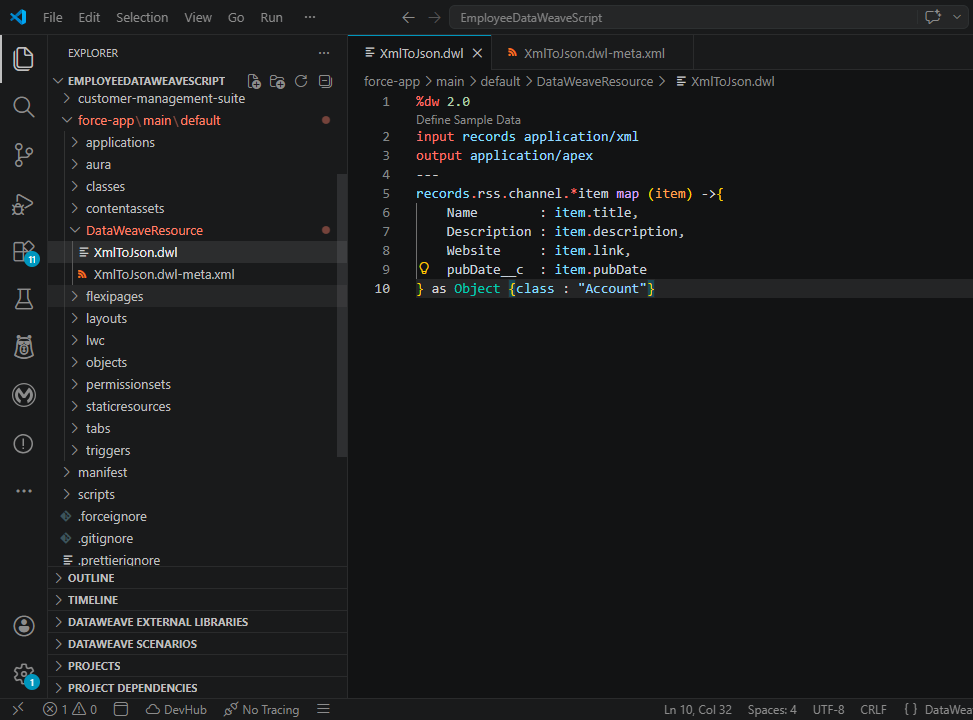
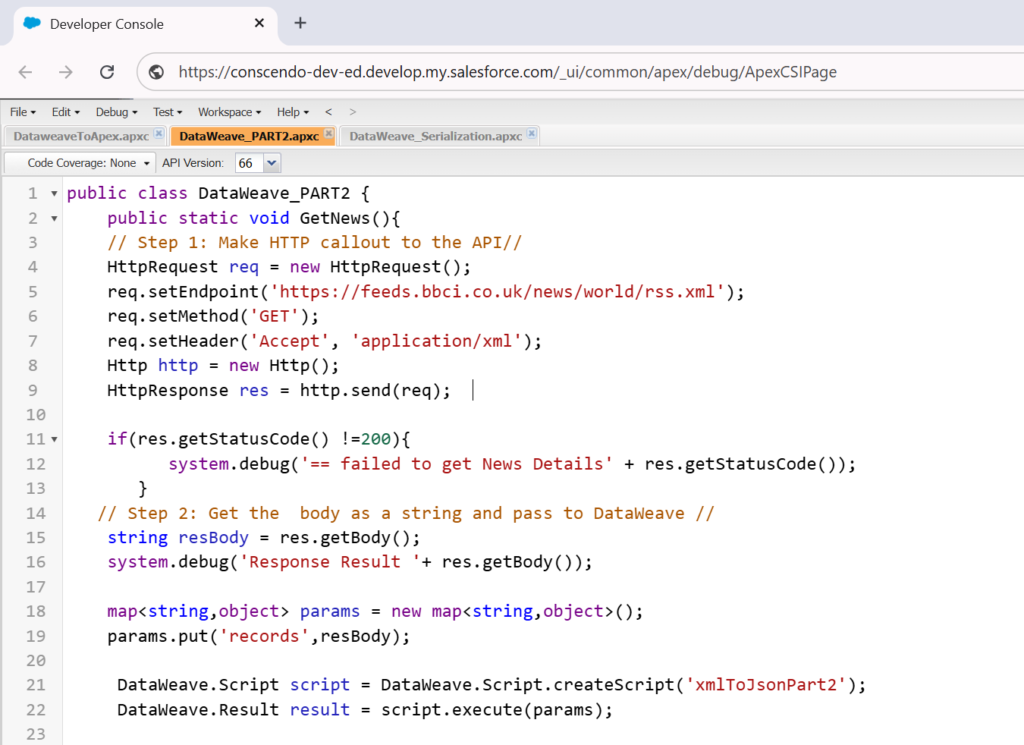
Apex Logic : HTTP Callout and DataWeave Execution
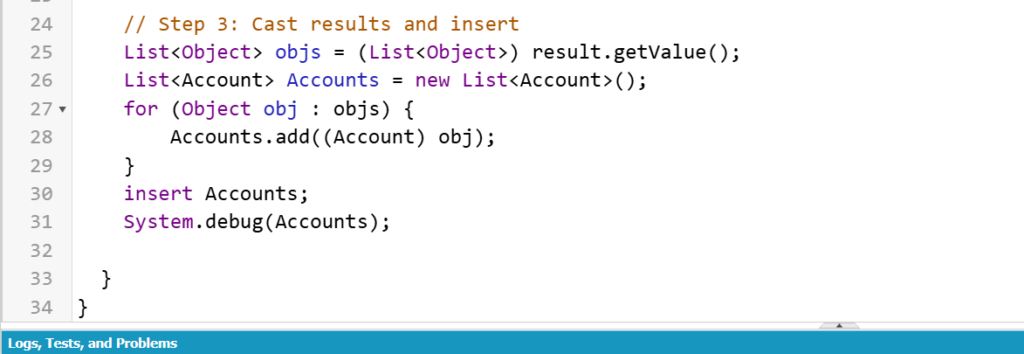
The Apex class DataWeave_PART2 handles the HTTP GET callout to the external XML API endpoint. Once the response is received, the raw XML body is passed into the DataWeave script as input. After the DataWeave script executes, the result is cast from a generic List<Object> into a typed List<Account>. The records are then inserted into Salesforce using a standard DML insert statement, completing the inbound integration flow.
Output :
POC 2: Pushing Salesforce Data to an External REST API via HTTP POST
Overview
The outbound integration pattern positions Salesforce as the data producer retrieving records from its database, transforming them into a structured JSON payload, and dispatching them to an external REST API that accepts data in JSON format over HTTP POST.
This pattern is widely adopted in enterprise integrations where downstream systems such as ERP platforms, marketing tools, data warehouses, or third-party SaaS applications require Salesforce data in a standardized JSON format.
Solution Overview
- Record Retrieval via SOQL : Apex queries the required Salesforce records, fetching relevant fields from objects such as Account, Contact, or Order.
- Data Serialization with DataWeave : A DataWeave transformation script converts the Apex objects into a well-structured JSON payload, applying field mappings, renaming conventions, and data type conversions as required by the target API contract.
- HTTP POST Callout : Salesforce constructs an HttpRequest object, sets the method to POST, attaches the serialized JSON as the request body, and configures appropriate headers including Content-Type: application/json and authentication headers such as Bearer tokens or API keys.
- Response Handling : The HTTP response is captured and evaluated. Success responses (2xx) confirm data receipt, while error responses (4xx or 5xx) trigger exception handling or retry logic.
- Logging and Error Management : Integration logs or platform events track callout outcomes, supporting observability and debugging in production environments.
DataWeave Script : Serializing Salesforce Records to JSON
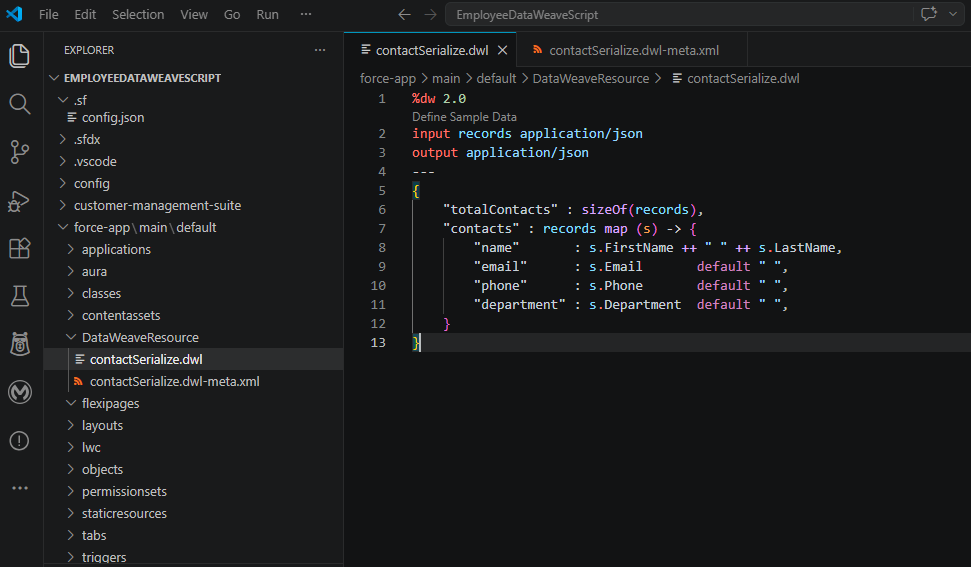
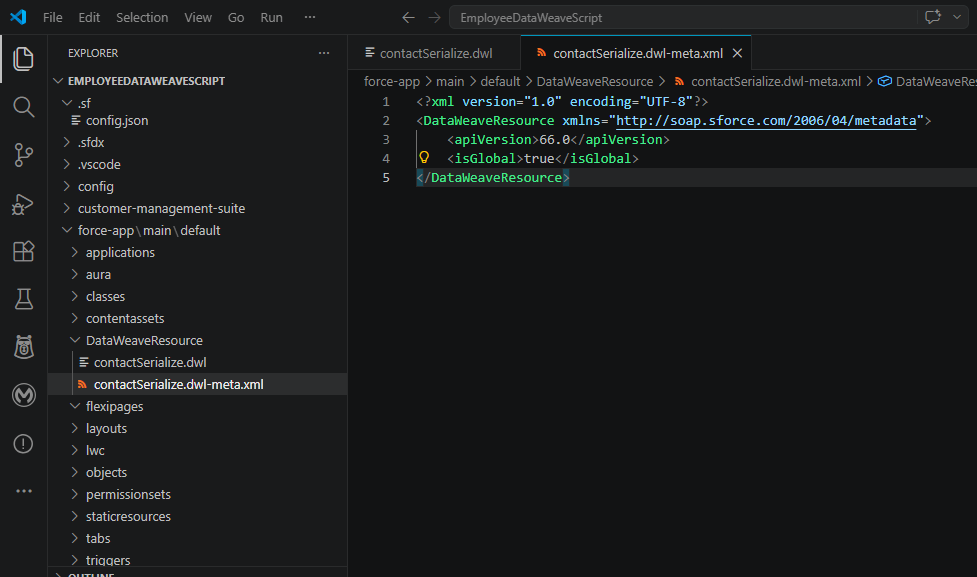
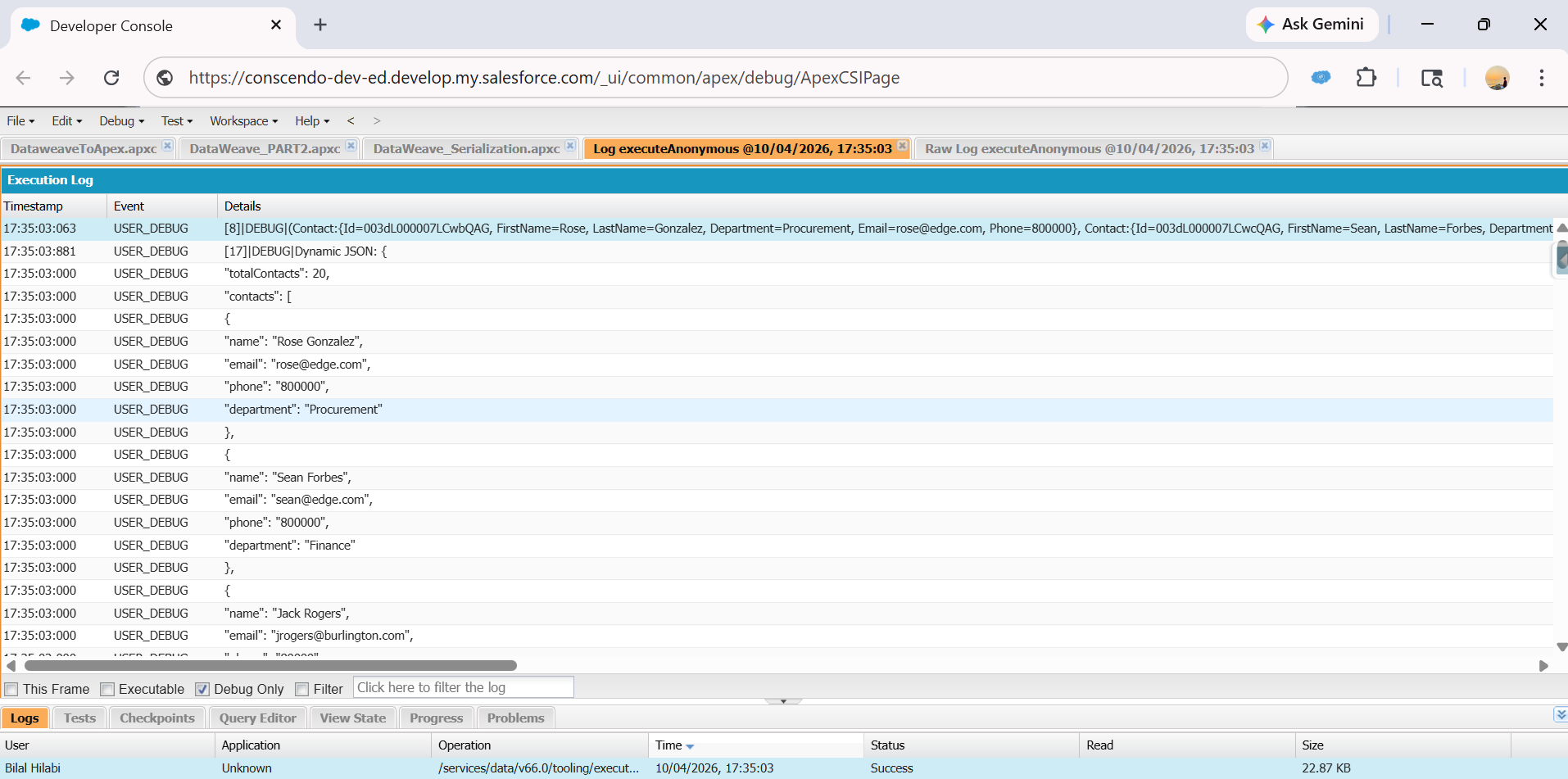
The following DataWeave script (contactSerialize.dwl) accepts a list of Salesforce Contact records as input and transforms them into a structured JSON payload. It maps FirstName and LastName into a combined name field, and applies default fallback values for email, phone, and department when field data is absent ensuring the outbound payload is always well-formed and API-compliant.
Input :

Apex Logic : SOQL Query, DataWeave Execution, and HTTP POST
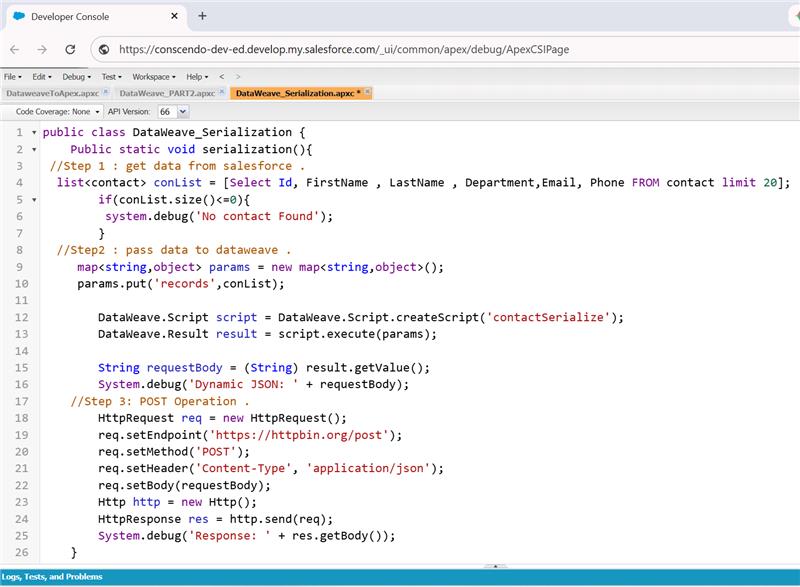
The Apex class DataWeave_Serialization orchestrates the full outbound flow in three steps. First, it retrieves Contact records from Salesforce via SOQL. Second, the records are passed into the DataWeave script, which serializes them into a JSON string. Third, the JSON payload is dispatched to the external REST API endpoint t using an HttpRequest configured with the POST method and Content-Type: application/jsonheader.
Output:
Key Technical Considerations
- Named Credentials : Endpoint URLs and authentication are managed securely through Named Credentials, eliminating hardcoded values in Apex classes.
- Remote Site Settings : External endpoints must be registered under Remote Site Settings to authorize outbound callouts from Salesforce.
- Governor Limits : Apex enforces a limit of 100 HTTP callout statements per transaction with a timeout of 120 seconds. Bulk scenarios must leverage asynchronous patterns such as Queueable or Batch Apex.
- JSON Structure Validation : DataWeave enforces strict field mapping and type coercion, ensuring the outbound payload conforms to the target API schema without manual string construction.
- Error Response Parsing : DataWeave can parse error responses from external APIs, extracting meaningful messages for logging or alerting workflows.

Limitations of DataWeave in Apex
While DataWeave in Apex is a powerful capability, it is important to be aware of its current limitations before adopting it in production:
- Static Resource Dependency : DataWeave scripts must be stored and deployed as static resources (.dwl files). They cannot be created or modified dynamically at runtime within Apex.
- Governor Limit Exposure : DataWeave transformations executed within synchronous Apex transactions are subject to standard Salesforce governor limits, including CPU time and heap size limits, which can be impacted by large payload transformations.
- Limited Debugging Support : Unlike standard Apex, DataWeave scripts do not have native debug log support within Salesforce. Errors during script execution surface as generic exceptions, making troubleshooting more reliant on the DataWeave Playground for pre-validation.
- No Dynamic Script Generation : DataWeave scripts are static by nature. Conditional transformation logic must be built within the script itself and cannot be generated or modified programmatically from Apex at runtime.
- Learning Curve :Developers familiar only with Apex may require additional time to learn DataWeave’s functional, expression-based syntax, especially for complex nested transformations.
- Output Type Constraints : DataWeave in Apex currently supports a defined set of output types such as application/json, application/xml, and application/apex. Not all DataWeave output formats available in MuleSoft are supported within the Salesforce Apex context.
- Callout Restrictions : DataWeave scripts themselves cannot initiate HTTP callouts. All external API interactions must be handled by Apex, with DataWeave limited strictly to the transformation layer.
DataWeave Playground
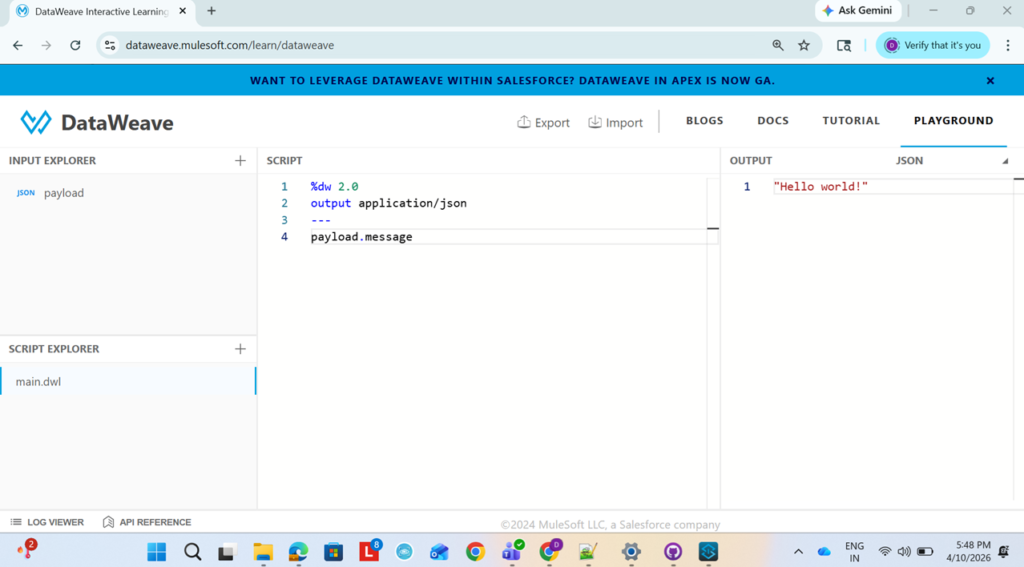
Before diving into the POCs, it is worth understanding the DataWeave Playground an interactive, browser-based environment provided by MuleSoft that allows developers to write, test, and validate DataWeave transformation scripts without any setup or deployment.
Why Use the DataWeave Playground?
When working with complex data transformations especially across formats like XML, JSON, and CSV testing transformation logic in isolation before integrating it into Salesforce is invaluable. The Playground provides an instant feedback loop that drastically reduces development and debugging time.
How It Works
- The Payload panel on the left accepts the input data XML, JSON, CSV, or any supported format.
- The Script panel in the center is where the DataWeave transformation logic is written.
- The Output panel on the right displays the transformed result in real time.
Developers can prototype, validate, and fine-tune their .dwl scripts entirely in the browser before deploying them as Salesforce static resources.
Benefits of the DataWeave Playground
- Zero Setup :No installation or Salesforce org required to start writing and testing transformations.
- Real-Time Output : Transformation results are visible instantly, accelerating the development cycle.
- Format Flexibility :Supports testing across XML, JSON, CSV, and Apex output formats.
- Error Visibility: Syntax and runtime errors are surfaced immediately, making debugging straightforward.
- Collaboration Friendly: Scripts can be exported and shared across teams, promoting reuse and consistency.
Assignments For Practice
{

    "first_name": "Dhanusha",

    "last_name":  "Mediboyina",

    "age":        24,

    "course":     "MuleSoft Developer",

    "city":       "Hyderabad",

    "active":     true

} - How do you access first_name in DataWeave?
- How do you change first_name to uppercase in DataWeave?
- How do you filter only first_name and last_name from this JSON?
- Write a DataWeave script to combine first_name and last_name into full_name.
- How do you check if age is greater than 18 in DataWeave?
- How do you provide a default value if city is null?
{

  "emp_id": "E101",

  "name": {

    "first": "Anil",

    "last": "Reddy"

  },

  "department": "IT",

  "salary": 50000,

  "is_active": true

} - How do you access the employee’s first name in DataWeave?
- How do you create a new field full_name by combining first and last name?
- How do you increase the salary by 10% using DataWeave?
- How do you filter only emp_id and department fields?
{

  "order_id": "ORD123",

  "customer_name": "Sita",

  "items": [

    {

      "product": "Laptop",

      "price": 60000,

      "quantity": 1

    },

    {

      "product": "Mouse",

      "price": 500,

      "quantity": 2

    }

  ],

  "total_amount": 61000,

  "status": "shipped"

} - How do you access the first item’s product name?
- How do you calculate total price dynamically using price * quantity for each item?
- How do you transform only the items array into a new structure?
- How do you filter items where price is greater than 1000?
- How do you change the status to uppercase?
Conclusion
DataWeave in Apex stands out as a production-ready, enterprise-grade transformation engine capable of handling the full spectrum of Salesforce integration scenarios from consuming complex XML APIs to dispatching structured JSON payloads to external REST endpoints.
Adopting DataWeave as the standard for data transformation within Salesforce development significantly reduces integration complexity, improves code maintainability, and accelerates delivery timelines while maintaining the flexibility to integrate with virtually any system, regardless of data format or protocol.